Quote Chaser: your quote follow-ups, queued daily
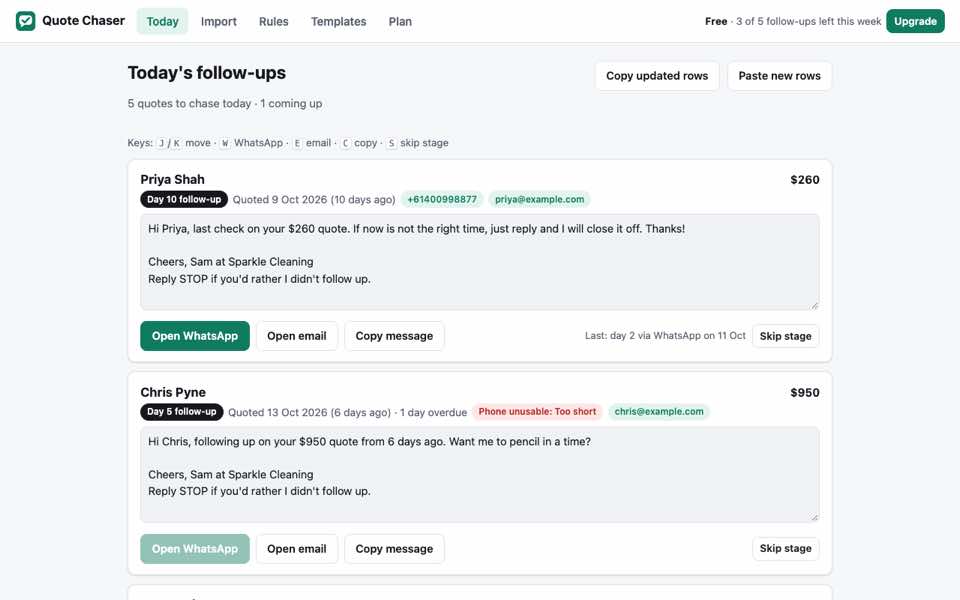
Quote Chaser turns the quote rows in your spreadsheet into a daily follow-up queue, with the WhatsApp or email message filled in. Nothing is sent until you send it.
Free on the Chrome Web Store. The install link goes live here at launch.
How it works
- Copy rows from Google Sheets, Excel, Numbers or CSV.
- Match the name, phone, email, amount, date and status columns. The mapping is saved for that layout.
- Review due quotes. Open WhatsApp, email or Gmail with the recipient and message filled in, or copy the message. Nothing is sent until you send it.
Features
- Follow-ups on days 2, 5 and 10
- Missed stages advance to the latest due stage
- Won, lost, booked and declined quotes leave the queue
- Templates can include name, amount, date and days since the quote
- Australian mobile formats are normalised; unusable numbers are flagged
- Country presets for eight other countries
- Actions are recorded by quote and stage
- Copy updated rows back with follow-up columns
- Keyboard shortcuts and light/dark modes
Your data
Rows, settings and history are stored in Chrome's local extension storage. Opening WhatsApp, Gmail or your email app passes the recipient and message to that service. Pro licence keys are checked with Polar. Quote Chaser has no account or analytics. Read the privacy policy.
Free
- 5 follow-up actions per rolling 7 days
- Built-in schedule and templates
- WhatsApp, email and copy actions
Pro, US$39 a year
- Unlimited follow-up actions
- Custom templates
- Up to 8 custom stages
Checkout runs on Polar. See the terms.
Select Load sample rows to see the workflow.